
.NETPro #12 | Special Edition: Ready to master partial types in C#? Start Part 1 of our new series with Mark J. Price
Partial Types and Members: Breaking Apart and Reassembling C# Classes: Part 1

Have you ever started a C# project that quickly grew into a tangle of huge classes and endless code files? Modern .NET projects move fast and often involve multiple developers, so keeping things tidy can feel impossible. This is where partial classes and members step in. They let you break a complex class into manageable pieces, keep generated code separate from your own, and add platform-specific logic without the clutter. The result is cleaner, more maintainable codebases that are much easier to share across a team.
Today's issue kicks off a special four-part series, Partial Types and Members: Breaking Apart and Reassembling C# Classes, written by long-time .NET and C# expert and bestselling author Mark J. Price.

You can enjoy each issue of this special four-part series on its own, and we’ll release a new part every month from October through December 2025.
Across the series, we’ll trace the evolution of partial features from their introduction in C# 2 to the upcoming enhancements in C# 14 and .NET 10, while exploring classes, methods, properties, events, and constructors with clear explanations and real-world exercises.
In today’s issue, we’ll begin with a quick introduction to partial classes and members, setting the stage for the series. We’ll then take a deeper dive into partial classes.
Here's a quick glance at what's inside:
➡️ Why C# introduced partial classes in version 2, and how Visual Studio uses them for designer-generated code
➡️ The key benefits of splitting a class across multiple files for organization, teamwork, and code generation
➡️ A hands-on Severance-inspired example showing how “innie” and “outie” behaviors live in separate files but compile into one class
➡️ A peek under the hood at how the C# compiler merges partial class parts and handles conflicts
➡️ A quick Q&A round to test your knowledge and reinforce what you’ve learned
Before you jump in, check out these highlights from our last editions if you missed them:
➡️ Discover what's new in ASP.NET Core in .NET 10
➡️ Use GPT-OSS with Ollama to create fast, private, offline-capable AI features in C#
➡️ Learn how to build, run, and use MCP servers with .NET
➡️ Explore how .NET 10 Preview 7 accelerates .NET MAUI with XAML Source Generator
➡️ Master authentication and authorization in Minimal APIs
Cheers!
Adrija Mitra
Editor-in-Chief


📱 Partial Types in C#: Organizing Big Classes & Generated Code
When building projects in C#, you may encounter situations where you want to split the definition of a class and its members across multiple files. This is exactly what partial classes and partial members allow you to do.
Introducing partial classes and partial members
C# lets you declare a class (or struct, interface, or record) in pieces, and similarly divide certain members (such as methods, properties, events, and constructors) into separate parts. At build time, the compiler merges these pieces into one complete definition.
This feature is especially useful for:
Keeping automatically generated code separate from hand-written code
Managing large classes that multiple developers work on simultaneously
Injecting platform-specific logic
If you’re already comfortable with regular (non-partial) classes and members, this article will show you how partial features work and why they’re valuable. We’ll explore each type of partial feature in C#, from partial classes and partial methods introduced early in the language to partial properties, events, and constructors added more recently in C# 13 and C# 14.
For clarity (and a bit of fun), the examples will borrow characters and concepts from the TV series Severance. Think of a partial class like a Lumon Industries employee with a split identity: the “innie” (at work) and the “outie” (outside work) live in separate worlds but together form one person. Similarly, partial classes allow different pieces of a class to live in different files yet unify into one complete type when compiled, or in Severance terms, reintegrated.
Historical timeline of partial features
Note: If you’re already familiar with the evolution of partial features, you can skip ahead to the Partial Classes – One Class, Multiple Files (C# 2) section.
Partial types and members have been introduced gradually throughout C#’s history. The table below outlines each partial feature and the version in which it was introduced or is expected to appear:


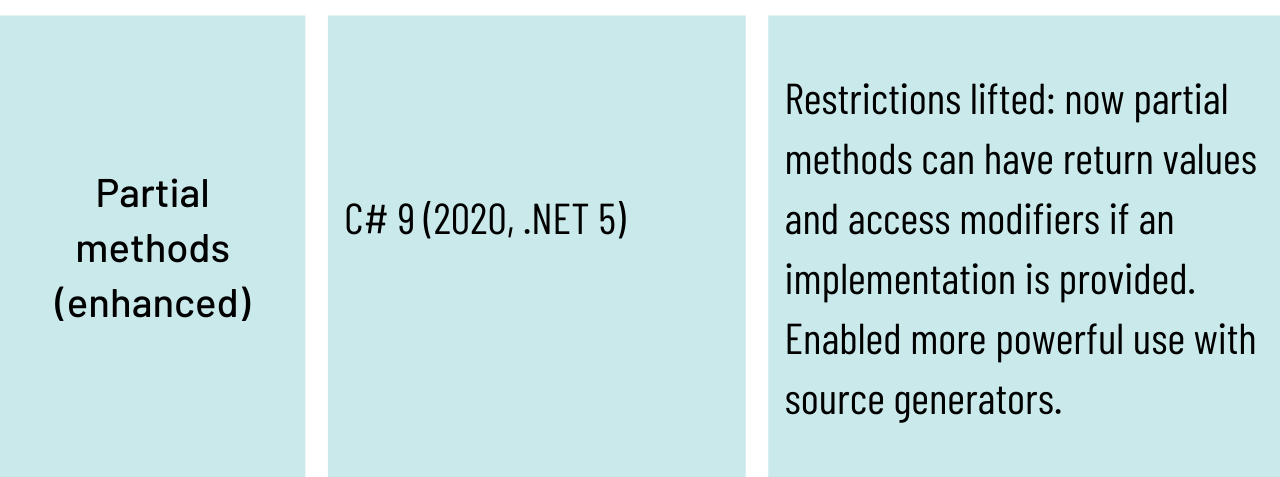


As the table shows, partial classes were the first to arrive in C# 2. Over time, the concept was extended to methods, then much later to properties and indexers in C# 13, and now to events and constructors in C# 14. For more details, see the official documentation: The history of C#.
In the Partial Types and Members: Breaking Apart and Reassembling C# Classes series, we’ll explore each of these features, examine how they work, and walk through examples from a (fictional) Lumon Industries codebase. We’ll begin with partial classes, the focus of today’s issue.
📝 Spotted something worth calling out? We’d love to hear about it—just drop us a quick note through this 1-min survey. We’re all ears!
Partial classes: one class, multiple files (C# 2)
A partial class is a class whose definition is split across two or more files. Each file contains a partial class ClassName with some of the class’s members, and together they form the complete class.
Partial classes were introduced in C# 2 to make it easier to manage large classes and to integrate with code generation tools. For example, Visual Studio’s Windows Forms designer generates one part of a form class (containing all the UI control initialization code) in an auto-generated file, while you write your event-handling code in another file. At compile time, both partial class definitions merge into a single class. This way, you don’t have to touch the designer’s generated code, and it won’t overwrite your changes when the file is regenerated.
Key benefits of partial classes include:
Organizing large or multi-faceted classes: You can split a big class into logical pieces (for example, UI code versus business logic) across separate files, making it easier to navigate and maintain.
Enabling collaboration: Multiple developers can work on different parts of the same class simultaneously without merge conflicts, since each works in a separate file.
Supporting code generation: A tool or source generator can create part of a class, and you can extend it by writing the other part without resorting to inheritance or complex workarounds.
All parts of a partial class must be in the same namespace, assembly, and module, share the same accessibility (all public, all internal, etc.), and use the partial keyword in their declaration. The compiler then combines them, merging attributes and interface implementations from each part into a single unified class.
Example: Splitting “innie” and “outie” behavior
As you know from Severance, each employee has two distinct personas: an “innie” at work and an “outie” outside. We can model this idea with a single class defined in two partial files, one for work-related behavior and the other for life outside the office, as shown below:
// File: SeveredEmployee.Innie.cs

public partial class SeveredEmployee

{

  public void WorkOnProject()

  {

    Console.WriteLine($"{Name} is crunching numbers in the office.");

  }

}


// File: SeveredEmployee.Outie.cs

public partial class SeveredEmployee

{

  public void EnjoyFreeTime()

  {

    Console.WriteLine($"{Name} is enjoying life outside of Lumon.");

  }

}


// File: SeveredEmployee.Shared.cs

public partial class SeveredEmployee

{

  public string Name { get; }


  public SeveredEmployee(string name)

  {

    Name = name;

  }

}


// Usage

SeveredEmployee mark = new("Mark S.");

mark.WorkOnProject();

mark.EnjoyFreeTime();


// Expected output:

// Mark S. is crunching numbers in the office.

// Mark S. is enjoying life outside of Lumon.
In this example, SeveredEmployee is defined across multiple .cs files. One file contains the innie’s WorkOnProject() method, another contains the outie’s EnjoyFreeTime() method, and a third defines a constructor and the shared Name property (though shared members could also go in an existing file).
When compiled, these parts are merged into a single SeveredEmployee class with all members. Code that uses SeveredEmployee can call both WorkOnProject() and EnjoyFreeTime() on the same object as if everything were defined together. This separation is especially useful when one part of the class is auto-generated by a tool (imagine Lumon’s system generating the work-related methods) while another part is written by a developer.
Under the hood
The C# compiler simply stitches the partial definitions together, ensuring there are no conflicts. If two parts of a partial class define a member with the same signature, the compiler reports an error because duplicates are not allowed.
However, one partial file can declare a private field and another can contain methods that use it, since all parts are merged into a single class. This is why, in the example above, the Name property could be placed in one file and still be accessed by methods in another. Partial classes do not create multiple copies of data; when you instantiate the class, you still get one object that contains all the members from all partial declarations.
📝 Spotted something worth calling out? We’d love to hear about it—just drop us a quick note through this 1-min survey. We’re all ears!
⏱️ Quick Q&A Corner
Quick bites to level up your understanding
Q1: What are the drawbacks or pitfalls of using partial classes?
A: Partial classes can make a class’s code harder to navigate if its definition is scattered across multiple files. There’s no runtime cost (the compiler merges all parts into one class), but overusing partial classes may hurt readability and make maintenance more difficult in the long run.
Q2: What are the best practices for using partial classes effectively?
A: Some of the most effective best practices include:
Use partial classes sparingly and organize them clearly.
Maintain one primary file for core definitions and use additional partial files for distinct features or interface implementations.
Follow a consistent naming scheme (e.g., Employee.Payroll.cs, Employee.UI.cs) to indicate that those files belong to one class.
Each partial file should have a single, focused purpose.
Q3: Can partial classes help organize a class implementing multiple interfaces?
A: You can put each interface’s implementation in its own partial file while still compiling into one class. For example, if a class implements two interfaces, the methods for each can be grouped into separate partial files. This setup makes the code easier to navigate and maintain, without altering the class’s outward behavior.
We began this series by looking at partial classes, the foundation for splitting types in C#. The next milestone in the timeline is C# 3, where the concept was extended to methods. Partial methods bring the same flexibility to individual member definitions, opening up powerful new extensibility patterns. We’ll explore them in the next part of the Partial Types and Members: Breaking Apart and Reassembling C# Classes series, releasing on October 7, 2025.
💌 Got something interesting to share or want your project featured? Just comment on this post and share your ideas.
And that's a wrap 🎬
Thanks for joining us for this edition of .NET Pro!
If you have any thoughts, questions, or feedback on this edition, or if you'd like to share what you'd love to see next, feel free to take our 1-min survey or hit Comment and drop us a note. We'd love to hear from you.
Thanks for following along. Until next time, keep learning and keep building. 😊